How to Choose an Android Rugged Tablet PC?
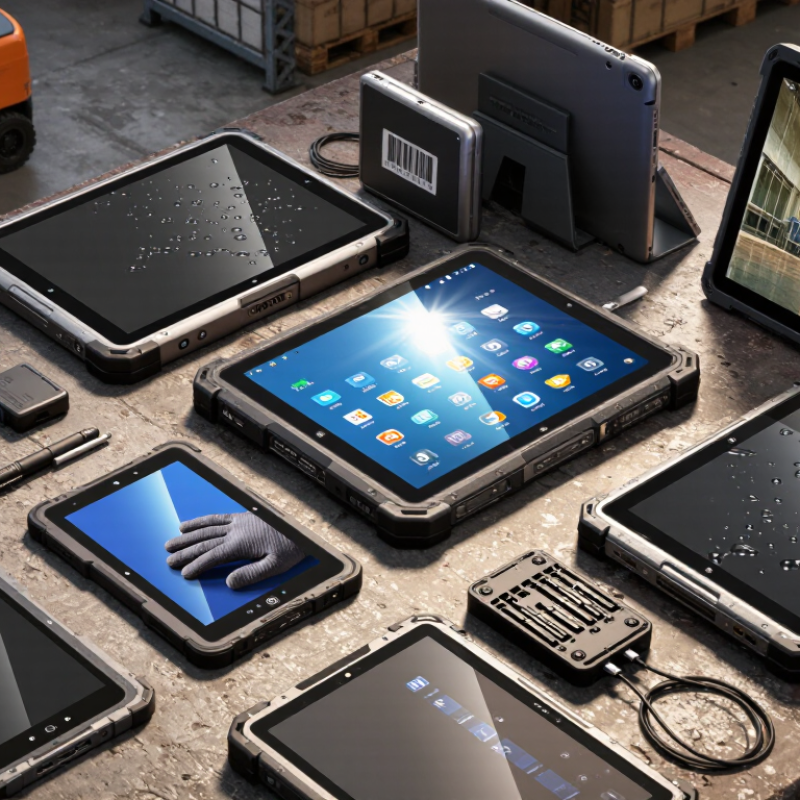
Choosing an Android Rugged Tablet PC is not simply a matter of selecting the largest screen or fastest processor. In warehouses, trucks, hospitals, and outdoor service sites, small design choices become operational costs. A tablet may face dust, rain, vibration, cold storage rooms, and repeated drops from a workbench. It must also remain readable under strong sunlight and respond to gloved fingers.
The Mobile Economy 2024 report from GSMA valued mobile technologies and services at approximately $6.4 trillion in global economic value during 2023. This figure highlights the growing importance of dependable mobile devices across industries. However, broad mobile-market growth does not prove that every rugged tablet suits professional work. Market reports often classify “rugged” products differently, so buyers should examine test conditions carefully. MIL-STD-810H describes testing methods, not automatic product certification. IEC 60529 IP ratings also measure specific protection levels, not total durability.
A practical evaluation should connect specifications with daily tasks. Check barcode performance beside metal racks. Test screen visibility near a warehouse entrance. Confirm battery endurance across a full shift, not only laboratory figures. Android Enterprise guidance and NIST SP 800-124 Rev. 2 also support stronger device management, access control, and update planning. Vendor documentation matters, but real deployment evidence matters more. A beautiful specification sheet can still disappoint.
This guide compares processors, display design, IP and drop protection, battery systems, Android support, connectivity, accessories, and total ownership cost. The right Android Rugged Tablet PC is the one that reduces interruptions without creating new maintenance problems. Some compromises remain unavoidable. Recognizing them early is better than discovering them beside a broken forklift scanner.
Define the Work Environment and Durability Requirements
How to Choose an Android Rugged Tablet PC?
Define the Work Environment and Durability Requirements
Start with the place where the tablet will operate. A warehouse needs protection from dust, drops, vibration, and cold storage rooms. A construction site adds concrete dust, rain, gloves, and uneven ground. Outdoor logistics may require sunlight readability and reliable GPS performance. The U.S. Bureau of Labor Statistics recorded about 2.6 million nonfatal workplace injuries in private industry during 2023. That figure supports a practical point: equipment should reduce handling risks, not create new ones.
Check measurable protection ratings instead of trusting phrases like “industrial grade.” Under IEC 60529, IP65 means complete dust protection and resistance to water jets. It does not mean safe submersion. A tablet with an IP68 rating may perform better around heavy rain, but the manufacturer’s test depth and duration still matter. Test conditions can vary.
Drop resistance also needs careful reading. A listed drop height usually comes from controlled laboratory testing, not a metal staircase or a wet loading dock. Ask whether the test used protective cases, operating devices, and repeated drops. The U.S. military environmental testing standard contains separate methods for shock, vibration, temperature, humidity, and altitude. One number cannot represent every jobsite.
I would also test the tablet with work gloves, bright sunlight, and a cracked-screen scenario. Specifications often look convincing on a desk. Field reality is less polite. A short pilot trial can reveal weak speakers, unreliable charging ports, or buttons that are too small.
How to Choose an Android Rugged Tablet PC?
Define the Work Environment and Durability Requirements
Use the chart as a practical starting point: the first IP digit indicates protection against solid particles, while the second indicates protection against water. Dusty, wet, outdoor, and washdown environments generally require progressively higher protection levels. Confirm the final requirement against the actual cleaning process, temperature range, shock exposure, and applicable safety standards.
Compare Screen, Size, Weight, and Mounting Options
Choosing an Android rugged tablet starts with the worksite, not the processor.
Grand View Research estimates the rugged tablet market will grow at roughly 7% annually through 2030. That growth reflects real field needs, including outdoor readability, glove use, and vehicle mounting. A bright display is essential. For direct sunlight, consider at least 700 nits, while 1,000 nits provides more practical headroom. Glossy glass can still create reflections. I have learned that specifications alone do not predict comfort.
Screen size changes handling. An 8-inch tablet fits a jacket pocket and works well beside a ladder or service panel. A 10-inch screen gives maps, forms, and inspection photos more room. Yet it can become tiring during long handheld shifts. Keep viewing distance in mind. OSHA guidance commonly recommends about 20 to 40 inches for screen viewing. Weight matters. A 700-gram device may feel acceptable briefly, but tiring after repeated one-handed use. A balanced grip can matter more than a small weight difference.
Mounting changes everything. A vehicle dock should support locking, charging, vibration resistance, and quick release. A desk cradle needs stable cable routing and enough clearance for gloved hands. Check the mounting pattern, not only the advertised accessory list. VESA compatibility may simplify installation, but it does not guarantee a secure fit. Grand View Research, Rugged Tablet Market Report, 2024, identifies transportation, logistics, and industrial operations as major application areas. That is useful context, but every site remains different. The best choice may still be the one workers can hold comfortably for eight hours.
Evaluate Processing Power, Battery Life, and Connectivity
Processing power should match the daily workload, not just the screen size.
A field technician may scan labels, open maps, photograph damage, and sync records together. VDC Research identifies performance as a key factor in rugged mobile computer purchasing. Choose an octa-core processor, at least 6 GB of RAM, and fast internal storage for demanding applications. More cores do not always mean better performance. Test the tablet with real software, especially offline maps and camera uploads.
Battery life must be measured during realistic work. A claimed ten-hour runtime may shrink after maximum brightness, GPS tracking, cellular data, and repeated scanning. Look for a removable battery or hot-swapping support when technicians work beyond one shift. Check charging time, battery health reporting, and performance below freezing. I once focused too heavily on capacity. The charging workflow caused more downtime than expected.
Connectivity deserves equal attention. GSMA Intelligence reported about 4.7 billion mobile internet users in 2024, showing how dependent field operations have become on mobile access. Ericsson’s November 2024 Mobility Report forecast approximately 2.3 billion 5G subscriptions by the end of 2024. Select suitable 4G or 5G bands, dual-band Wi-Fi, Bluetooth, NFC, and accurate multi-constellation positioning. In warehouses, test handoffs between access points. In rural areas, test weak-signal recovery. A fast processor is still frustrating when synchronization fails.
Check Android Software, Security, and Device Management
When choosing an Android rugged tablet PC, inspect its software lifecycle before comparing screen size or drop ratings. Ask how long security patches remain available, how quickly critical fixes are released, and whether updates can be staged offline. Android security bulletins and NIST SP 800-124 Rev. 2 both emphasize timely patching, controlled applications, encryption, and secure device configuration. A useful tablet should support verified boot, application allowlisting, user separation, and kiosk mode. Simple menus matter in dusty warehouses.
Security is only effective when administrators can manage every unit remotely. The Ponemon Institute’s 2023 State of Endpoint Security Risk Report found that 68% of organizations experienced at least one successful endpoint attack during the previous year. That figure makes centralized control difficult to ignore. Check whether the tablet supports zero-touch enrollment, policy templates, remote lock, secure wiping, certificate management, and detailed audit logs. It should also report outdated software and failed compliance checks without requiring physical access.
Test it in realistic conditions. Enroll ten devices, interrupt a network connection, push an application restriction, and review the event records. Can workers still scan items safely? Can administrators recover a misplaced tablet without exposing stored data? I would not trust impressive security claims without testing recovery speed. Battery-saving settings may also delay updates. That small weakness deserves attention.